The Network · Chapter 10.a
How do you send a bit by hand?
Transcript
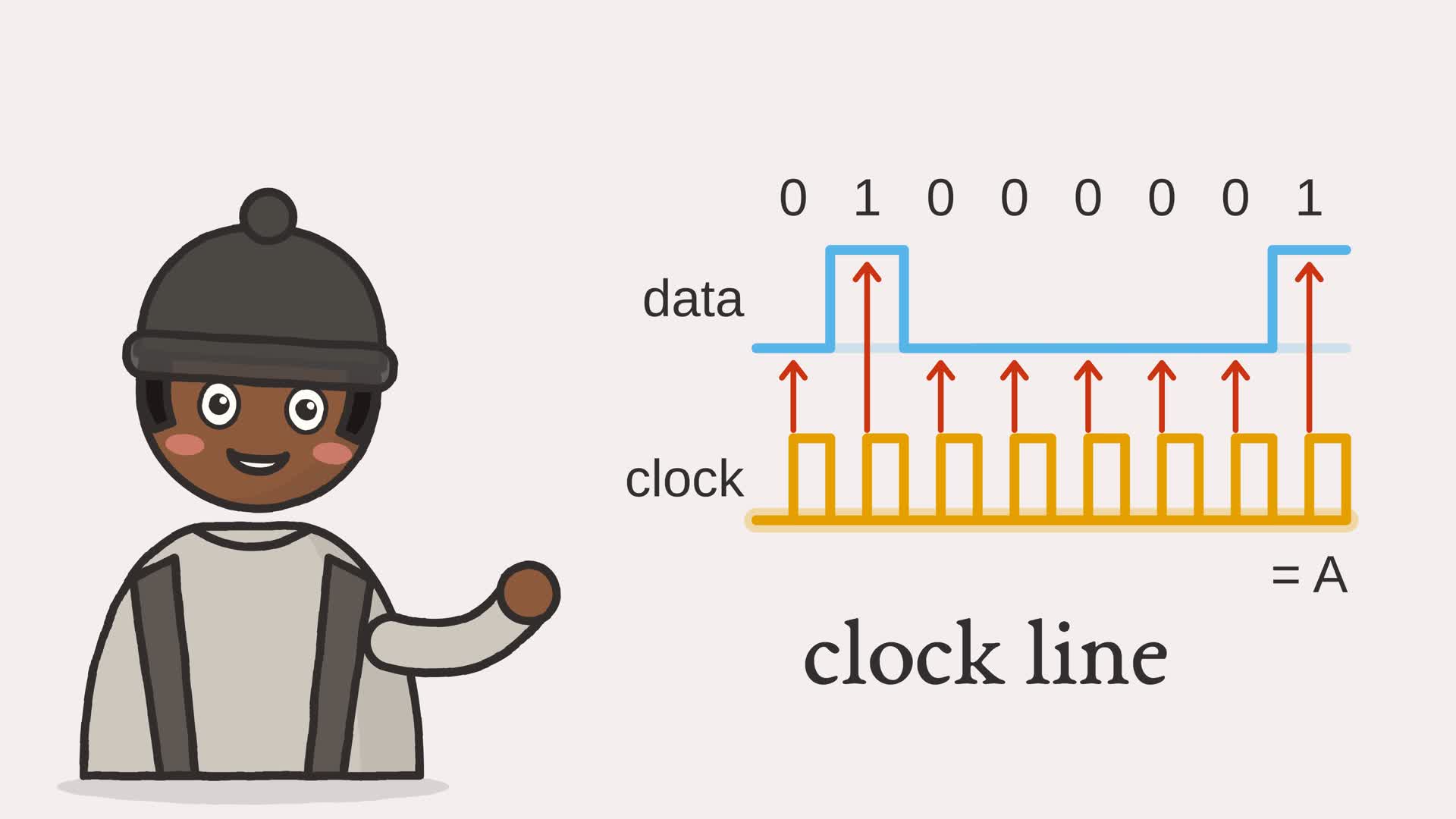
How do you send a bit by hand? You get two wires to the next chip, and nothing else.
I figured both sides would need their own clocks, perfectly in sync. But clocks drift, and a drifting receiver reads the wrong bit.
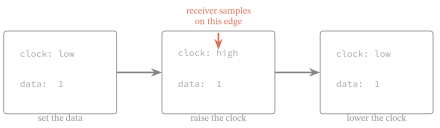
So send the clock too. Put the first bit on the data line: zero. Then pulse the clock, low to high. On that rising edge, the receiver reads the data line. Next bit: one. Pulse. Read. And again, and again. The sender only changes the data while the clock is low, so every edge catches it steady. Eight pulses, and the receiver has zero, one, zero, zero, zero, zero, zero, one: the letter A.
Send the clock along, and nothing drifts! A clock and a data line, driven by hand, carry any byte intact.
Pick any byte below, and watch it clock out one bit at a time, and come back exactly.
- The browser
- The network
- Software and languages
- The CPU
- Memory
- Arithmetic
- Logic gates
- The switch
Chapter 10 watched a single bit cross the wire in one figure, then moved up to bytes and frames. This chapter slows that crossing down and builds it. Picture a sender with nothing but two lines running to a receiver: a clock line and a data line. No networking hardware, no help. How does even a single bit get across? The answer is to drive the lines by hand, the same basic pattern a processor can use to talk to a chip sitting beside it.
10.a.1 Clocking out a byte
To send a bit, the sender puts it on the data line and then pulses the clock from low to high. That rising edge is a shared signal: it tells the receiver the data line is ready to be read. Chapter 10 worried that two clocks would drift apart; on this two-line link, sending the clock alongside the data removes that particular worry, because the receiver needs no separate free-running clock. Eight pulses, most significant bit first, carry a byte. Figure 10.a.2 clocks out the byte for the letter A.
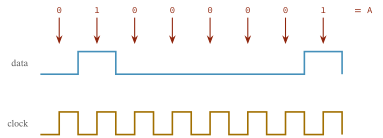
Example 10.a-1. Driving the two lines
def send(byte: int) -> list:
    """The line states a sender drives to clock out a byte: for each bit, one
    state with the clock low while the data is set, then one with the clock high
    on which the receiver samples. Each state is a (clock, data) pair."""
    states = []
    for bit in bits_of(byte):
        states.append((0, bit))     # data set, clock still low1
        states.append((1, bit))     # clock high: the rising edge to sample on2
    return states
- the data line is set while the clock is still low
- then the clock is raised: the rising edge the receiver samples on
10.a.2 Reading on the edge
The receiver does the mirror image. It watches the clock, and only when the clock goes from low to high, a rising edge, does it read the data line and shift that bit into the byte it is building. Holding the data steady and moving only on the edge is what keeps the two ends in step; it is the whole trick, shown one bit at a time in Figure 10.a.3.
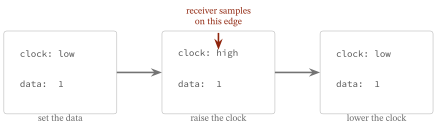
Example 10.a-2. Sampling on each rising edge
def receive(states: list) -> int:
    """Read a byte back by sampling the data line on each rising clock edge, most
    significant bit first."""
    byte = 0
    previous_clock = 0
    for clock, data in states:
        if clock == 1 and previous_clock == 0:    # a rising edge1
            byte = (byte << 1) | data2
        previous_clock = clock
    return byte
- a bit is read only on a rising edge, when the clock was low and is now high
- each read bit is shifted into the byte, most significant first
10.a.3 Bit-banging, run
Running ftb.bitbang clocks out the letter A, shows the two lines, and then sends every possible byte through and back.
sending 65 (binary 01000001, the letter 'A')
clock: 0 1 0 1 0 1 0 1 0 1 0 1 0 1 0 1
data:  0 0 1 1 0 0 0 0 0 0 0 0 0 0 1 1
received: 65

every byte from 0 to 255 survives the round trip: True
A clock and a data line, driven by hand, carry any byte intact, all 256 of them. This is the shape of real protocols like SPI and JTAG, and it is what lies under the framed wire of Chapter 10. Back at the surface, the next chapter asks how a machine on a shared link finds a neighbour’s link address.
Exercises
- Send two bytes one after another. How does the receiver tell where the first ends and the second begins?
- Change the sender to clock out the least significant bit first. What must the receiver change to match?