The Machine · Chapter 5.b
Optional read: How does a CPU go faster?
Transcript
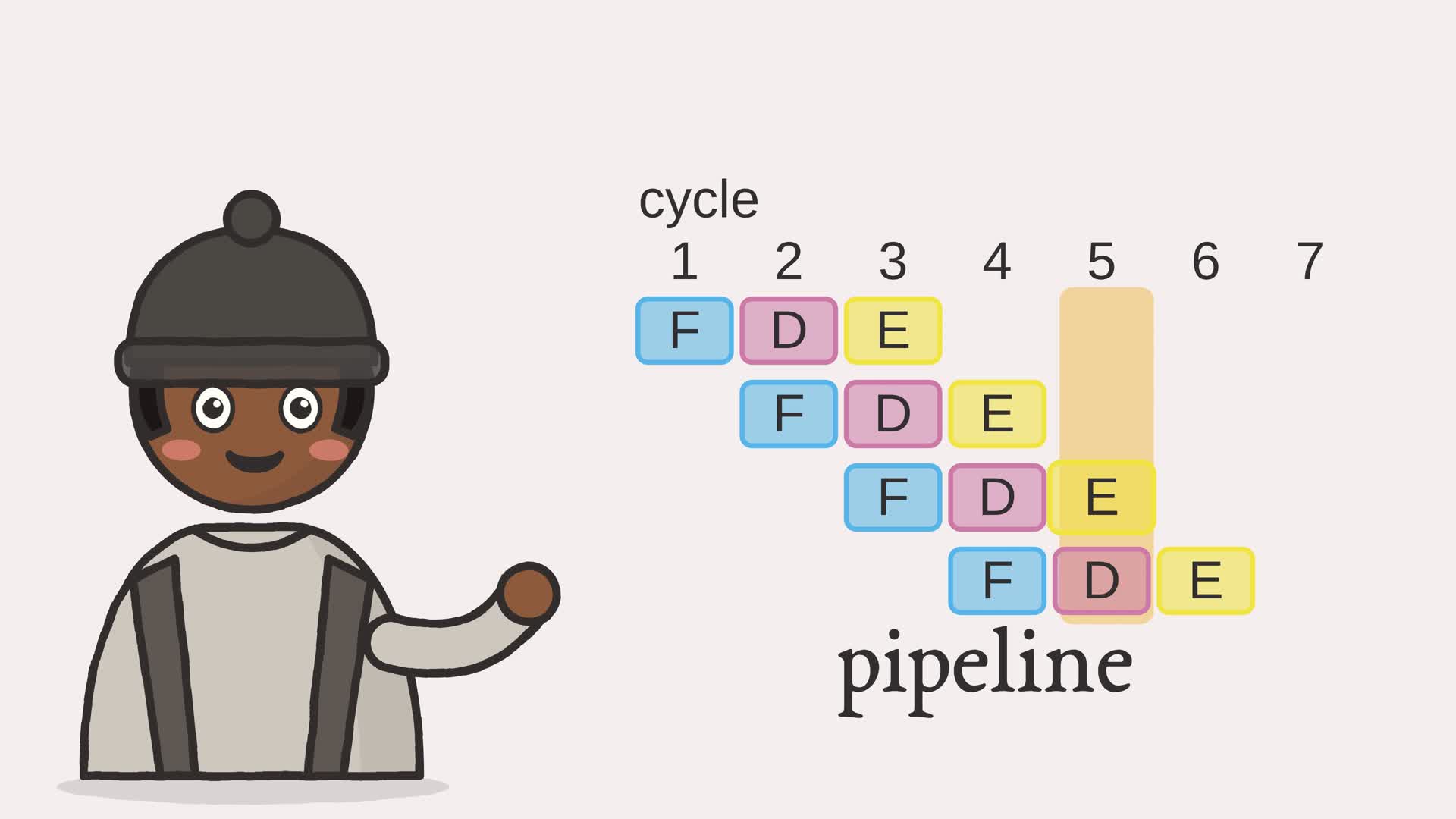
How does a CPU go faster? Ours runs three steps per instruction, one at a time. Four instructions take twelve steps.
Easy, I thought: just run the clock faster. But each step is gates settling, and they won't settle any quicker.
Look at the steps again: While one instruction executes, the fetch part just sits there. So fetch the next one right away. Cycle one: fetch the first. Cycle two: decode it, and fetch the second. Cycle three: three instructions in flight, one in each step. From then on, one finishes every cycle. Four take six cycles, not twelve. The catch? If one needs an answer that isn't ready, it waits a cycle.
Faster, and no step got quicker! Overlapping the steps is a pipeline, and once it's full, one instruction finishes every cycle.
Below, run instructions that don't need each other, then a chain that does. Where do the gaps come from?
- The browser
- The network
- Software and languages
- The CPU
- Memory
- Arithmetic
- Logic gates
- The switch
The processor of Chapter 5 runs one instruction all the way through, fetch then decode then execute, before it starts the next. If the stages have the resources they need, one instruction can execute while the next decodes and the one after that fetches. Overlapping stages this way is a pipeline. The accumulator CPU cannot simply overlap every operation: LOAD, ADD, and STORE also use memory during execute and can compete with fetch.
To isolate timing, this chapter uses a separate machine with several named registers and three one-cycle stages. Its instruction records say which registers are read and written; they are not the CPU’s encoded bytes. Fetch and execute are assumed to have independent resources, so we can focus on waiting for an operand and guessing a branch. The code schedules these records and computes their values sequentially; it does not call or pipeline CPU.step().
5.b.1 Overlapping the stages
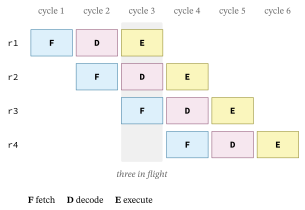
If a new instruction starts each cycle and every instruction takes three stages, then once the pipeline fills, three instructions are always in flight and one finishes every cycle. Four instructions that would take twelve cycles one at a time finish in six. Figure 5.b.2 lays the stages out on a timeline.
Scheduling the pipeline is bookkeeping over cycle numbers: place each instruction one cycle after the last, unless it must wait.
Example 5.b-1. Scheduling instructions through the pipeline
def schedule(program: list) -> tuple:
    """Place each instruction's three stages on a timeline, in order, stalling an
    instruction until every register it reads has been written back. Returns the
    per-instruction stage cycles and the total number of cycles."""
    execute = []          # the cycle each instruction reaches its execute stage
    written = {}          # register -> index of the last instruction that writes it
    for index, ins in enumerate(program):
        earliest = execute[index - 1] + 1 if index else _STAGES - 11
        for src in ins.srcs:
            producer = written.get(src)
            if producer is not None:
                earliest = max(earliest, execute[producer] + 2)2
        execute.append(earliest)
        written[ins.dst] = index
    stages = [{"fetch": e - 2, "decode": e - 1, "execute": e} for e in execute]
    total = execute[-1] + 1 if execute else 03
    return stages, total
- in order, one instruction reaches the execute stage each cycle, so normally it follows a single cycle behind the one before it
- unless it reads a register an earlier instruction is still computing: then it waits two cycles past that instruction, a stall
- the run takes as many cycles as the last instruction’s execute, plus one because cycles are numbered from zero; there is no separate write-back stage in this model
5.b.2 When an instruction must wait
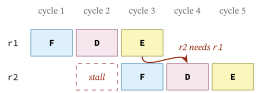
The stall in callout 2 is the price of a data hazard. If an instruction needs a value the instruction just ahead of it has not finished computing, it cannot proceed; it has to wait until that value exists. A bubble opens in the pipeline, and everything behind it slips a cycle. Figure 5.b.3 shows one.
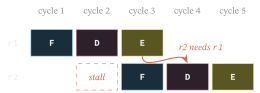
A pipeline is only allowed to overlap instructions because the result is the same as running them one at a time. Here the schedule models only the timing; the computed result is simply the sequential one, so the program does not prove the equivalence. What it does check is the hazard rule, which is exactly what lets a real overlapped pipeline keep that same result: no instruction reads an operand before the instruction that produces it has computed it.
Example 5.b-2. Checking the schedule is safe
def hazard_safe(program: list, stages: list) -> bool:
    """True if every instruction reads its registers only after the instruction
    that writes each one has reached its execute stage, so no operand is read
    before it exists."""
    written = {}
    for index, ins in enumerate(program):
        for src in ins.srcs:
            producer = written.get(src)
            if producer is not None and \
                    stages[index]["decode"] <= stages[producer]["execute"]:1
                return False
        written[ins.dst] = index
    return True
- a schedule is unsafe if any instruction reads a register at or before the cycle the instruction writing it reaches execute; a safe schedule keeps every read strictly later
A real pipeline softens this with forwarding: the instant an instruction computes a value in its execute stage, that value is routed straight to the instruction behind it, rather than making it wait for the write-back. Many stalls disappear, but the shape of the hazard, a value needed before it exists, stays the same.
5.b.3 Guessing the next instruction
A data hazard makes the pipeline wait; a branch makes it guess. A jump does not know where it goes until it executes, but by then the pipeline has already fetched the instructions sitting behind it. So the processor bets on the outcome and fetches that way. A branch predictor makes the bet from past behaviour: a two-bit counter with four states:
| State | Meaning | Prediction |
| 0 | strongly not-taken | not-taken |
| 1 | weakly not-taken | not-taken |
| 2 | weakly taken | taken |
| 3 | strongly taken | taken |
Each taken outcome increases the counter by one, each not-taken outcome decreases it by one, stopping at 3 or 0. From either strong state, two contrary outcomes change the prediction; from a weak state, one is enough. The model starts at 0. After warming up on a loop that runs many times and leaves once, it misses mostly on the way out.
Example 5.b-3. Predicting a branch
def predict(outcomes: list) -> int:
    """Count misses with a two-bit counter starting strongly not-taken (0).

    States 0 and 1 predict not-taken; 2 and 3 predict taken. Two contrary
    outcomes flip the prediction from a strong state, one from a weak state.
    """
    state = 0                                # 0,1 predict not-taken; 2,3 taken
    misses = 0
    for taken in outcomes:
        if (state >= 2) != taken:1
            misses += 1
        state = min(state + 1, 3) if taken else max(state - 1, 0)2
    return misses
- the guess is taken once the counter has leaned that way, states two or three; a miss is a guess that did not match what happened
- each outcome nudges the counter one step towards it, so a steady branch saturates fast and then stays right
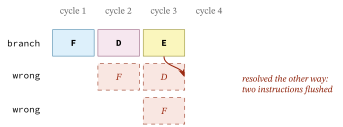
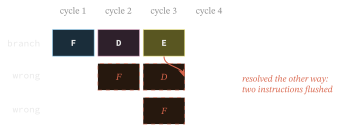
When the guess is wrong, the instructions fetched behind the branch were the wrong ones and are thrown away. Figure 5.b.4 shows the cost.
Return to the accumulator CPU with those rules in mind. Its arithmetic instructions repeatedly read and write the same accumulator, so they form dependent chains. Overlapping them would require pipeline storage, hazard control, and either stalls or extra memory access paths when fetch and execute compete. We have studied the scheduling problem, leaving that CPU unchanged. Even with those resources, a pipeline still waits for slow memory. The next chapter asks how a cache reduces that wait.
Exercises
- Add a fifth independent instruction to the four shown. How many cycles does the schedule take, and why only one more?
- Write a program where each instruction needs the result of the one before it. How many stalls appear?
- Compare predict([True, False] * 10) with predict([True, True] + [False, True] * 10). Trace the first few counter states. Why can a warm-up change how well alternation is predicted?