The Software · Chapter 6
How is code turned to bits?
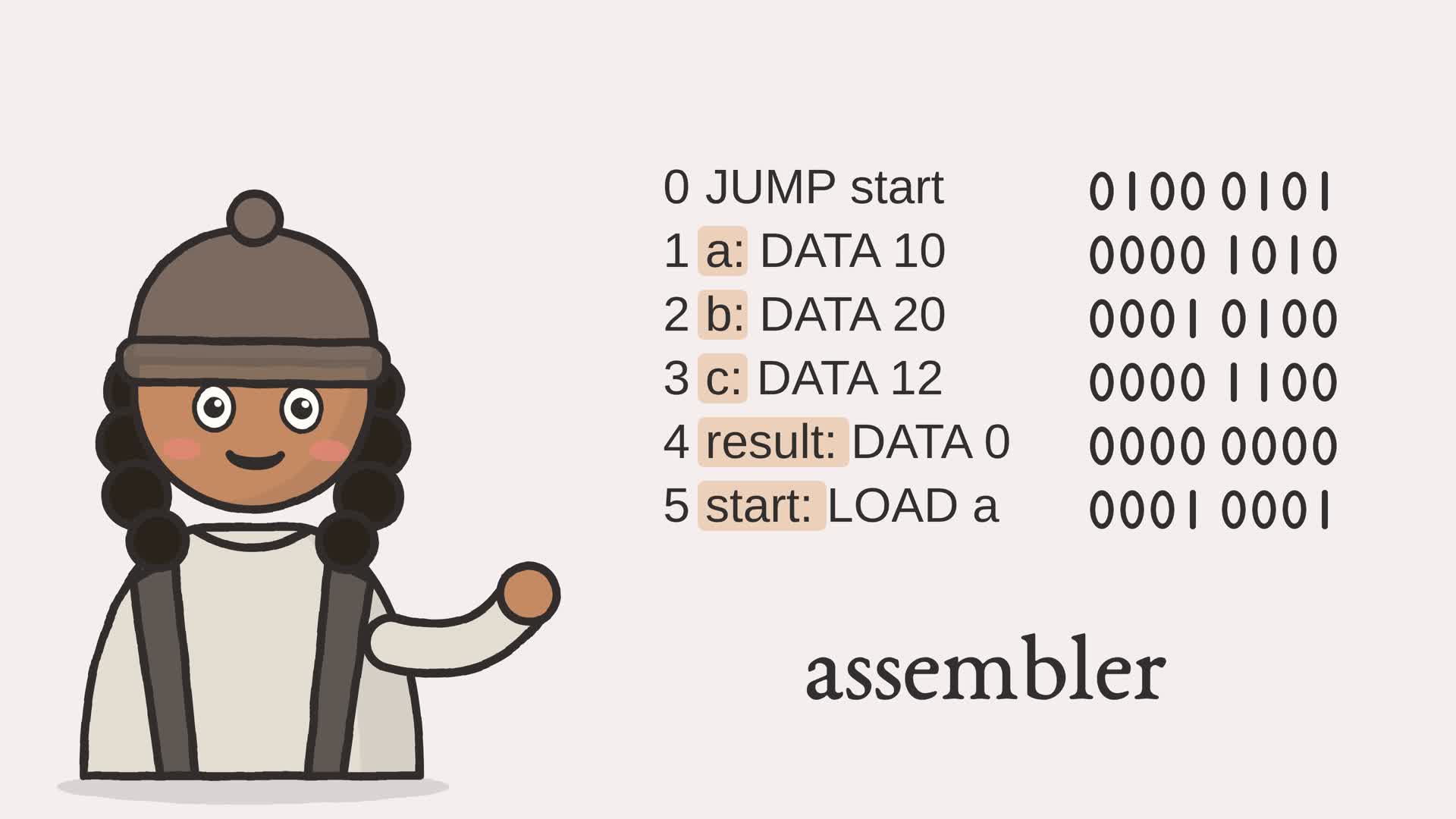
Transcript
How is code turned to bits? Our CPU reads only numbers, packed by hand. Add one line, and every address below it moves.
I figured you'd read it once, top to bottom, swapping each name for its number. But line one jumps to start, and start comes later.
So read it twice. Pass one only counts: each line gets the next address, and nothing is written yet. Each label goes in a table. Start sits at address five. Pass two writes the numbers. Jump is four: zero one zero zero. Start is five, from the table: zero one zero one. Together, that's one byte: sixty-nine. Line by line, every name becomes the number we used to pack by hand.
So a program does the counting for us! An assembler turns names into numbers, so you never count an address again.
Type your own lines into the assembler below, and watch each name become a byte.
- The browser
- The network
- Software and languages
- The CPU
- Memory
- Arithmetic
- Logic gates
- The switch
Part I built a CPU that obeys 8-bit words. To make it do anything in Chapter 5 we wrote those words by hand, packing an opcode and an address into each byte with encode. That is how the hardware reads a program. It is a miserable way for a person to write one. This chapter builds the first piece of software in the book: an assembler, a program whose only job is to translate readable text into the words the CPU executes. It is the first translator in a chain that, many chapters from now, ends at a browser.
6.1 The trouble with writing bytes
Look again at how Chapter 5 built its example program. Every line was a call like program[0] = encode(LOAD, 13). The programmer had to know that the data lived at address 13, count instruction slots by hand to fill in the indices, and re-count every one of them whenever the program changed. Insert a single instruction near the top and every address below it shifts by one. The numbers are correct but fragile, and keeping them correct is exactly the kind of bookkeeping a machine should do.
An assembler removes that bookkeeping. You write instructions with names, both for the operations and for the locations, and the assembler assigns the numbers. You never count an address again.
6.2 An assembly language
The input is plain text, one instruction per line. A line may begin with a label:, a name for the address that line will occupy. After the optional label comes either an instruction (a mnemonic such as LOAD with an operand) or the directive DATA, which places a literal value in memory rather than an instruction. An operand is either a number or the name of a label. Anything after a semicolon is a comment, and blank lines are ignored.
Here is the same sum-three-numbers program from Chapter 5, written in this language instead of hand-encoded:
        JUMP start          ; skip over the data cells
a:      DATA 10
b:      DATA 20
c:      DATA 12
result: DATA 0
start:  LOAD a              ; acc = a
        ADD b               ; acc = a + b
        ADD c               ; acc = a + b + c
        STORE result        ; result = acc
        HALT
Nothing here is an address. The data cells are named a, b, c, and result; the code that uses them refers to those names. The very first instruction, JUMP start, leaps over the data so the CPU does not try to execute it: the four DATA words sit at the front, and start marks where the real code begins.
The first job is to turn each line into three plain fields. The _parse function strips comments and blank lines, peels off any label, and returns one (label, mnemonic, operand) triple per line.
Example 6-1. Parsing one line into label, mnemonic, and operand
def _parse(source: str) -> list[tuple[str, str, str | None]]:
    """Return (label, mnemonic, operand) triples; comments and blanks removed."""
    triples = []
    for raw in source.splitlines():
        text = raw.split(";", 1)[0].strip()1
        if not text:
            continue
        label = ""
        if ":" in text:
            label, text = text.split(":", 1)2
            label, text = label.strip(), text.strip()
        if not text:
            triples.append((label, "", None))
            continue
        fields = text.split()
        if len(fields) > 2:
            raise ValueError(
                f"expected a mnemonic and at most one operand: {text!r}")
        operand = fields[1] if len(fields) > 1 else None
        triples.append((label, fields[0].upper(), operand))
    return triples
- everything from the first semicolon onward is dropped, and the rest is trimmed, so comments and indentation never reach the assembler
- if a colon is present, the text before it is the label and the text after it is the instruction, which may be empty when a label sits alone on its line
6.3 Why it takes two passes
There is one obstacle. The instruction JUMP start names a label that is defined five lines later. Reading the file once from top to bottom, the assembler reaches the JUMP before it has ever seen start, so it cannot yet know the address to fill in. The standard answer is to read the program twice. Figure 6.2 shows the shape.
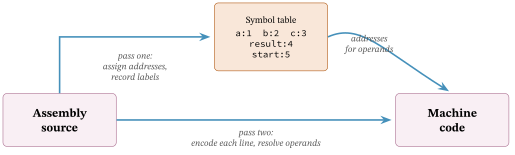
Pass one assigns each instruction the next address in sequence and, whenever it meets a label, records that label’s address in a symbol table. It does not encode anything yet. Pass two walks the instructions in order and encodes each one, resolving a label operand by looking it up in the table the first pass built. By the time pass two needs the address of start, pass one has already filled it in. A mnemonic outside the instruction set is rejected during the second pass; the assembler does not guess.
Example 6-2. The two-pass assembler
def assemble(source: str) -> list[int]:
    """Translate assembly source into a list of machine-code words for the CPU."""
    # Pass one: give each instruction the next address, record where labels land.
    symbols = {}
    instructions = []
    for label, mnemonic, operand in _parse(source):
        if label:
            symbols[label] = len(instructions)1
        if mnemonic:
            instructions.append((mnemonic, operand))
    # Pass two: encode each instruction, resolving its operand through the table.
    program = []
    for mnemonic, operand in instructions:
        if mnemonic == "DATA":
            program.append(byte_word(_resolve(operand, symbols)))2
        else:
            if mnemonic not in _OPCODES:
                raise ValueError(f"unknown instruction {mnemonic!r}")
            program.append(encode(_OPCODES[mnemonic],3
                                  _resolve(operand, symbols)))
    return program
- pass one records a label at the address of the instruction it is about to append, so the name resolves to the right slot whether it sits on the instruction’s own line or on a line of its own above it
- a DATA directive emits its value directly: a data cell is a raw byte, not an encoded instruction
- every real instruction is encoded with encode from Chapter 5, its operand first resolved through the symbol table, so the output is exactly the words the CPU expects
A DATA value must be an integer from 0 to 255; values outside that byte range are rejected. This toy assembler assumes the program fits the sixteen-word space and does not range-check that a resolved operand fits the four-bit operand field; an address of sixteen or more would silently wrap rather than be rejected.
6.4 From source to machine code
Figure 6.3 is the whole translation at once: every line of the example program beside the 8-bit word it becomes. This is the centerpiece of the chapter, the moment readable text turns into the bytes of Chapter 5.
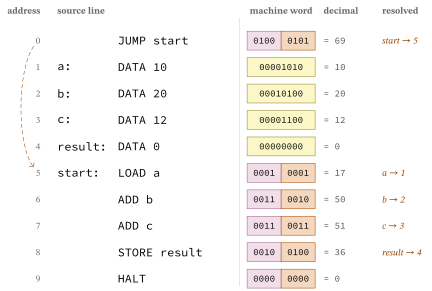
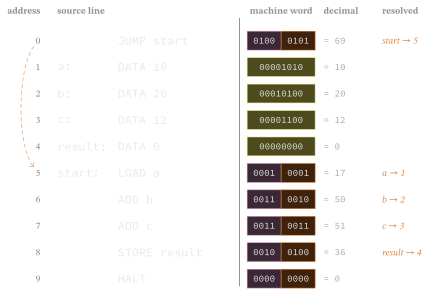
DATA directive
becomes one raw byte. The notes on the right name the operands resolved
through the symbol table: JUMP start became operand 5 because start
landed at address 5, and LOAD a became operand 1 because a landed at
address 1.Read the first row. JUMP start has opcode 4, which is 0100. Its operand is the address of start, and the symbol table says start is at address 5, which is 0101. Together the word is 01000101, or 69 in decimal. The four DATA rows below it are not split into fields at all; each is just the number written into that cell. And LOAD a became 00010001: opcode 1 for LOAD, operand 1 because a sits at address 1. Move the data cells around and every one of these operands would change, but the source text would not. That is the point of the assembler.
6.5 The assembler, run
Running ftb.assembler assembles the example program, prints the words it produced, and then runs them on the Chapter 5 CPU.
Assembled machine code (address: word, in binary):
   0:  69  01000101
   1:  10  00001010
   2:  20  00010100
   3:  12  00001100
   4:   0  00000000
   5:  17  00010001
   6:  50  00110010
   7:  51  00110011
   8:  36  00100100
   9:   0  00000000

Ran on the CPU; the accumulator holds 42.
The ten words match Figure 6.3 exactly, and the accumulator ends holding 42, the same answer Chapter 5 computed from its hand-encoded program. Nothing about the machine changed. What changed is that the program was written in names a person can read, and a program turned those names into bytes.
But a real program is rarely one file; the next chapter joins many assembled pieces into one image.
Exercises
- Assemble a program with a jump and read the encoded bytes. Which byte holds the jump’s target?
- Feed the assembler a misspelled instruction, and watch it refuse rather than emit wrong bytes.