The Software · Chapter 9
Who is in charge?
Transcript
Who is in charge? Our CPU runs one program. Your phone runs dozens at once, on the same few cores.
I figured the processor really runs them side by side. But it's only got one counter and one accumulator. That's room for one program at a time.
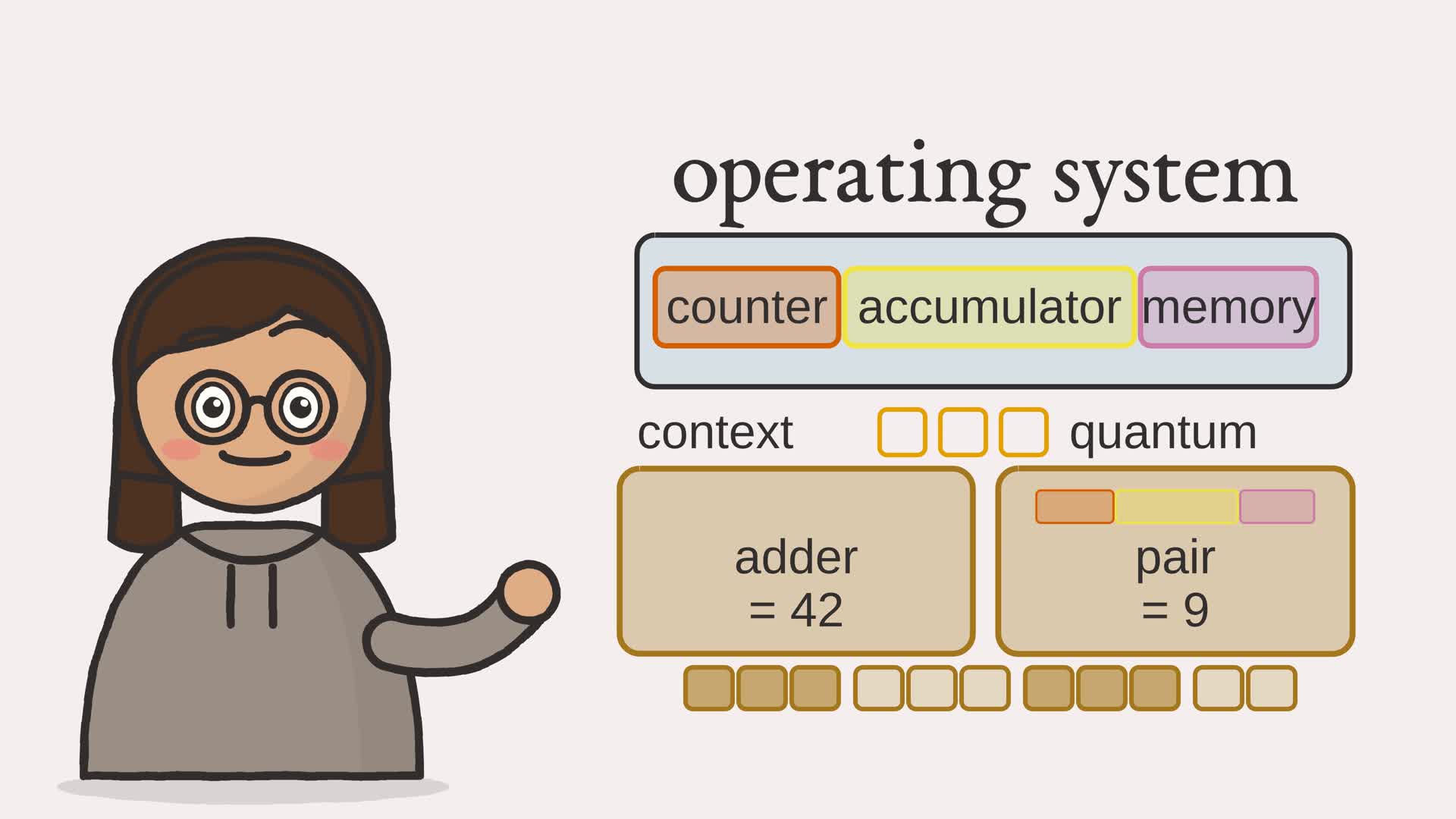
So something takes turns: A program called the operating system runs each one for a few steps: a quantum. Then it saves that program's context: its counter, its accumulator, its memory. It loads the next program's context, and lets that one run. The adder runs three steps, then the pair runs three, then back again. Neither can tell it was ever paused. The adder still gets forty-two, and the pair gets nine.
The operating system's in charge, taking turns really fast! Saving and restoring each program's context lets one machine pretend to be many.
Slide the quantum below, and run both programs. The turns change, but do the answers?
- The browser
- The network
- Software and languages
- The CPU
- Memory
- Arithmetic
- Logic gates
- The switch
The expression compiler used the CPU of Part I; the loop compiler then used a larger, named-memory model to focus on jumps. This chapter returns to the original sixteen-word CPU and programs assembled for it. Until now, each run has had its processor to itself. Real machines run many programs at once, and one of them is special: the operating system, the program in charge. It is a program like any other, but a privileged one. It decides which program runs, and it shares the single processor among all of them. This chapter builds a tiny operating system: a scheduler that runs several programs on one CPU by letting each take a turn.
Two ideas make that possible. Time-sharing gives each program the processor for a brief slice and then moves on, so all of them make progress. The context switch is how the slices are kept separate: there is only one set of registers, so before running the next program the operating system saves the current one’s state and restores the next one’s.
9.1 A process is a saved context
A running program is called a process. What makes it a process, rather than just a program text, is its state: where it is in its execution, what its registers hold, what its memory contains. That state is its context. For the machine of Chapter 5 the context is exactly four things: the program counter, the accumulator, the memory, and whether the program has halted. Save those four and you can stop a process cold; restore them and it resumes as if nothing happened.
Example 9-1. A process: a program plus its saved context
class Process:
    """A program together with its saved processor state.

    That state, the program counter, the accumulator, the memory, and a halted
    flag, is the process's context: everything the operating system must
    remember to pause the program and later resume it exactly where it left off.
    """

    def __init__(self, name: str, program: list[int]) -> None:
        self.name = name
        start = CPU(program)  # a CPU lays out the initial memory and registers1
        self.pc = start.pc
        self.acc = start.acc
        self.memory = start.memory
        self.halted = start.halted2
- a fresh CPU lays out the program’s initial state: the program counter at zero, the accumulator at zero, and the program loaded into a 16-word memory
- the halted flag completes the context; the saved program counter, accumulator, memory-list reference, and halted flag are everything needed to pause the process and later resume it
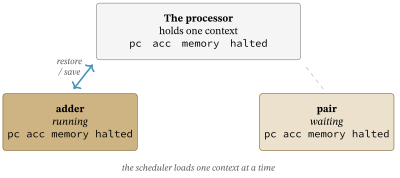
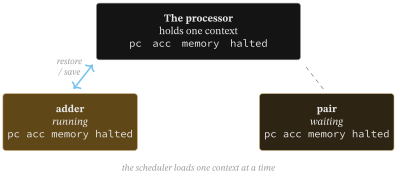
Because each process owns its context, switching between processes is a matter of swapping contexts in and out of the one processor. Figure 9.2 shows the arrangement: the processor has a single set of registers, and the scheduler loads one process’s context into it at a time, saving the previous one first.
9.2 Taking turns
The scheduler is the heart of the operating system. This one uses the simplest fair policy: round-robin. It keeps a list of processes and a single shared CPU. It gives the first process a fixed positive number of steps, called a quantum, then saves its context, restores the next process, and gives that one a quantum, and so on around the list, skipping any process that has halted, until all have finished.
Example 9-2. The round-robin scheduler
class Scheduler:
    """A round-robin scheduler over one shared processor.

    It runs each unhalted process for a quantum of steps, then switches to the
    next, saving and restoring each process's context across the switch, until
    every process has halted.
    """

    def __init__(self, processes: list[Process], quantum: int = 3) -> None:
        if quantum <= 0:
            raise ValueError("quantum must be positive")
        self.processes = processes
        self.quantum = quantum
        self.cpu = CPU([0])  # the one shared processor
        self.trace = []      # (process name, steps run) for each time slice

    def _restore(self, proc: Process) -> None:
        """Load a process's saved context into the shared processor."""
        self.cpu.pc = proc.pc
        self.cpu.acc = proc.acc
        self.cpu.memory = proc.memory
        self.cpu.halted = proc.halted

    def _save(self, proc: Process) -> None:
        """Save the shared processor's state back into the process's context."""
        proc.pc = self.cpu.pc
        proc.acc = self.cpu.acc
        # memory is already this process's list, restored by reference above;
        # reassigning it keeps save and restore symmetric.
        proc.memory = self.cpu.memory
        proc.halted = self.cpu.halted

    def run(self) -> None:
        """Run every process to completion, a quantum of steps at a time.

        This scheduler has no runaway guard: a process whose
        program never halts would loop here forever.
        """
        while not all(proc.halted for proc in self.processes):
            for proc in self.processes:
                if proc.halted:
                    continue
                self._restore(proc)1
                steps = 0
                while steps < self.quantum and not self.cpu.halted:2
                    self.cpu.step()
                    steps += 1
                self._save(proc)3
                self.trace.append((proc.name, steps))
- before a process runs, its saved context is restored into the one shared CPU; this is the first half of the context switch
- the process runs for at most a quantum of steps, stopping early if it halts partway through; this is the time slice
- its context is saved back out of the CPU, ready for the next process to be restored; this is the second half of the switch
The quantum is the whole of the policy. A small quantum switches often and feels responsive; a large one switches rarely and wastes less time on the bookkeeping of saving and restoring. Choosing it well is a real concern for real schedulers. The mechanism, though, is just save, restore, and a loop.
The quantum does force a switch partway through: a process that has not halted is stopped mid-run the moment its steps are spent. That preemption comes free here only because the CPU is simulated one step at a time, so the scheduler counts steps from outside the loop. A real operating system needs a timer interrupt to regain control from a core that is actually running. This toy swaps a reference to a process’s whole memory list; a real system switches its address-space mapping. Neither copies the whole memory on each switch. What this scheduler lacks is any guard against a program that never halts: such a process would spin the scheduler forever.
9.3 Time-sharing, traced
Running ftb.scheduler multitasks two programs, both assembled by the Chapter 6 assembler. One sums three numbers to 42; the shorter one sums two numbers to 9. With a quantum of three steps they interleave on the single processor.
One processor, shared in turns (quantum = 3 steps):
slice  process  steps
---------------------
  0    adder    3
  1    pair     3
  2    adder    3
  3    pair     2

adder: halted, accumulator holds 42
pair: halted, accumulator holds 9
Read the trace as a timeline, which Figure 9.3 draws. The adder runs three steps, then the pair runs three, then the adder runs three more and finishes, and finally the pair runs its last two and finishes too. The processor was never doing two things at once. It was doing one thing at a time, in turns, fast enough that both programs ran to completion.
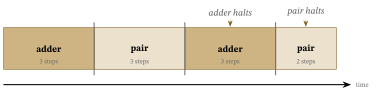
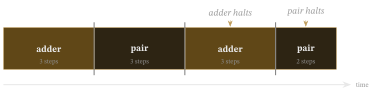
The crucial fact is the result. The adder’s accumulator holds 42 and the pair’s holds 9, exactly what each computes when run alone. Interleaving changed nothing about either answer. Because the context switch saves and restores every register faithfully, neither process can tell it was ever paused, and neither can disturb the other. That transparency is what lets one machine pretend to be many.
Sharing the machine is half the job. The next chapter models the request path: syscalls into kernel services. Later, virtual memory and page tables explain the mapping needed for private memory protection. These are separate models of operating-system mechanisms; they are not wired into this scheduler.
Exercises
- Change the number of steps each program runs before the switch from three to one. How does the interleaving change?
- Add a third program, and confirm each still gets its fair turn.