The Software · Chapter 6.a
How do programs combine?
Transcript
How do programs combine? A real program isn't one file. It's many, each assembled on its own.
I figured you'd just glue the pieces end to end. But each piece thinks it starts at address zero, and can't see the other's labels.
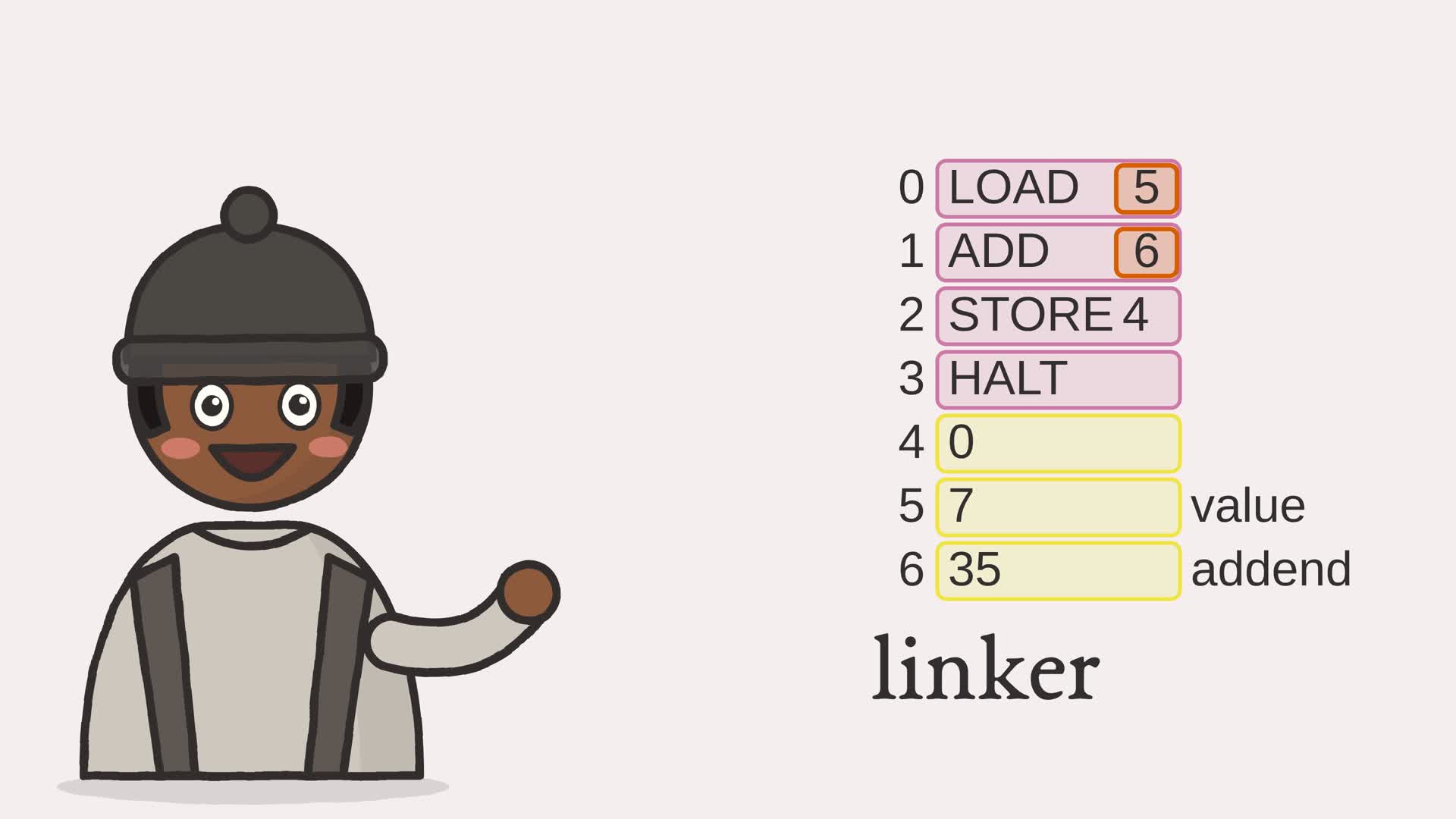
So each piece leaves blanks. The main piece wants value and addend, but can't know where they'll live. So it leaves two blanks, called imports. The data piece holds seven and thirty-five, and names them as exports. Now the linker lays the pieces end to end: main at zero, data right after it. Value lands at five, addend at six. Then it fills each blank: load five, add six.
So they combine by leaving blanks, and filling them later! The linker lays the pieces out, then fills every blank with its address.
Press link below, and watch main's blanks point past its own end, to where the data landed.
- The browser
- The network
- Software and languages
- The CPU
- Memory
- Arithmetic
- Logic gates
- The switch
The assembler of Chapter 6 turns one source file into machine code. But a real program is not one file. It is many, written and assembled separately, then joined at the end, along with libraries someone else wrote. A module assembled on its own faces two problems: it does not know where in memory it will finally sit, and it cannot know the address of a label defined in another file. So it is assembled into an object: its machine code, the labels it exports for others, and the imports it needs, left as blanks. The linker fills in the blanks.
6.a.1 Objects: code with blanks
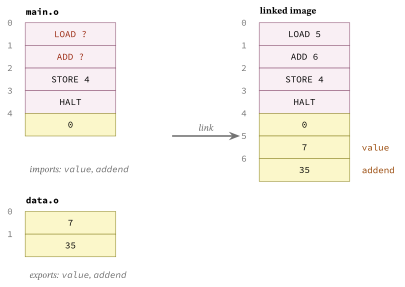
When a module names a label it does not define, the assembler cannot resolve it, so it leaves the operand blank and records an import: this position needs that symbol. Labels the module does define, it records as exports. Figure 6.a.2 shows two modules, one with code, one with data, and the single image the linker builds from them.
Example 6.a-1. Assembling a module on its own
def assemble_object(source: str) -> Object:
    """Assemble one module on its own. A label it defines becomes an export; an
    operand naming a label it does not define becomes an import, left as a blank
    for the linker to fill in."""
    exports = {}
    instructions = []
    for label, mnemonic, operand in _parse(source):
        if label:
            exports[label] = len(instructions)
        if mnemonic:
            instructions.append((mnemonic, operand))
    code = []
    imports = []
    for mnemonic, operand in instructions:
        address = 0
        if operand is not None and operand.lstrip("+-").isdigit():
            address = int(operand)
        elif operand in exports:1
            address = exports[operand]
        elif operand is not None:
            imports.append((len(code), operand))   # external: fill in at link time2
        if mnemonic == "DATA":
            code.append(byte_word(address))
        else:
            if mnemonic not in _OPCODES:
                raise ValueError(f"unknown instruction {mnemonic!r}")
            code.append(encode(_OPCODES[mnemonic], address))
    return Object(code, exports, imports)
- an operand naming a label the module defines is resolved at once, to a local address
- an operand naming a label defined elsewhere becomes an import: the position is recorded and the operand left blank, for the linker to fill
6.a.2 Linking and relocation
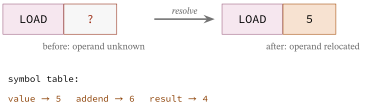
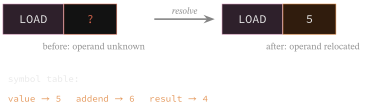
The linker takes a list of objects and does two things. It lays them out in memory, one after another, which finally fixes the address of every exported label. Then it walks the imports and fills each blank with its symbol’s address, a step called relocation. Figure 6.a.3 shows one operand being filled in.
Example 6.a-2. Laying out and relocating
def link(objects: list) -> list:
    """Combine objects into one image: lay each out at a base address, collect
    every export into one global table, then relocate each import to the final
    address of the symbol it names. Addresses must fit the machine's 4-bit
    operand, so the linked image is at most sixteen words."""
    image = []
    bases = []
    symbols = {}
    for obj in objects:
        bases.append(len(image))
        for name, local in obj.exports.items():
            if name in symbols:
                raise ValueError(f"symbol defined twice: {name}")
            symbols[name] = bases[-1] + local1
        image.extend(obj.code)
    for obj, base in zip(objects, bases):
        for position, name in obj.imports:
            if name not in symbols:
                raise ValueError(f"undefined symbol: {name}")
            opcode, _ = decode(image[base + position])
            image[base + position] = encode(opcode, symbols[name])2
    return image
- each exported label’s final address is its module’s base address plus where it sat inside that module
- relocation: the blank instruction is re-encoded with the symbol’s final address, leaving its opcode alone
6.a.3 The linker, run
Running ftb.linker assembles a code module and a data module separately, links them, and runs the result on the processor of Chapter 5.
module 'main':
  exports: {'result': 4}
  imports: [(0, 'value'), (1, 'addend')]  (blanks the linker must fill)
module 'data':
  exports: {'value': 0, 'addend': 1}

linked image: [21, 54, 36, 0, 0, 7, 35]
running it: accumulator holds 42
same as assembling one file: True
The code module imports value and addend as blanks; the data module exports them. After linking, the blanks point at addresses 5 and 6, where the data ended up, and the program computes 7 + 35. The last line is the guarantee: the linked image is byte for byte what assembling the same instructions as one file would have produced. Splitting a program across files changes nothing about what runs. One simplification remains: this linker resolves a module’s references to its own labels immediately, as local addresses, and relocates only the imports between modules. A module’s internal labels are therefore correct only when it sits at the start of the image, which is why the main module is linked first here; a real linker relocates every reference by wherever its module lands.
Assembly was the machine’s own language, one line per instruction; the languages people actually want to write are richer than that. The first step toward running them is the same humble one the assembler took on every line, cutting text into pieces, and that is where the next chapter begins.
Exercises
- Add a third module that exports a value the main module imports, and link all three into one image.
- Make two modules export the same name. What should the linker do, and what does it do?