Chapter 5
What is a CPU?
- The browser
- The network
- Software and languages
- The CPU
- Memory
- Arithmetic
- Logic gates
- The switch
Chapter 3 built an adder from gates: given two numbers it produces a sum and a carry after the gate delays settle, with no memory of what came before. Chapter 4 fixed that: a cross-coupled latch remembered one bit; a master-slave flip-flop disciplined that memory to a clock edge; and a decoder over a bank of registers became a RAM that holds words and keeps them, a memory this chapter grows to program size. Those two machines are not separate devices. They are components, and this chapter wires them together. The result is a CPU.
A CPU is a machine that reads instructions from memory and obeys them, one at a time. Each instruction names an operation and a memory address. The CPU fetches the instruction, decodes the two fields, carries out the operation, and then returns to fetch the next. That loop is called the fetch-decode-execute cycle. Running it fast and correctly is what a processor does.
5.1 The stored-program idea
Before the stored-program idea, a machine had to be rewired to change what it computed. The program was the machine. The insight that changed everything is simple: a program is just data. Instructions can live in memory alongside the numbers they operate on. To run a different program you write different bytes into memory; you do not touch the hardware.
The accumulator, the program counter, and the memory cells of this chapter are the components of Chapter 4 in spirit: a register to hold a running total, a register to hold the address of the next instruction, and a RAM to hold both the program and the data it works on. The model here keeps them as plain numbers rather than banks of flip-flops; the shape is Chapter 4’s even where the code is not. No new hardware is needed. What changes is how those components are connected and what directs them.
The director is the control unit, a small piece of logic that reads an opcode and asserts the right signals. Together, the ALU of Chapter 3, the memory of Chapter 4, and the control unit form the CPU.
5.2 An instruction set
An instruction set is the contract between software and hardware. It names every operation the CPU can perform and specifies how an instruction is encoded. The machine here is an accumulator machine: all arithmetic flows through a single working register called the accumulator. There is no general-purpose register file; every ADD reads one operand from memory and adds it to whatever the accumulator currently holds.
Six opcodes are enough to compute, to store results, and to branch.
| Name | Code | Effect |
| HALT | 0 | Stop. |
| LOAD | 1 | Accumulator ← memory[operand]. |
| STORE | 2 | Memory[operand] ← accumulator. |
| ADD | 3 | Accumulator ← accumulator + memory[operand]. |
| JUMP | 4 | PC ← operand (unconditional branch). |
| JZ | 5 | PC ← operand if accumulator = 0 (branch on zero). |
An instruction is one 8-bit word. The high nibble (bits 7 to 4) carries the opcode; the low nibble (bits 3 to 0) carries the operand, a memory address for every instruction that uses one. Figure 5.2 shows the layout. With a 4-bit opcode there is room for 16 distinct operations; with a 4-bit operand the machine can address 16 memory words directly. This chapter defines six of those opcode values; the remaining ten are unused and the model rejects them rather than treating them as hidden instructions.
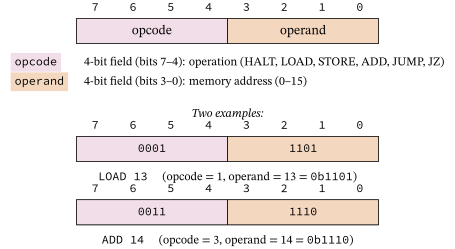
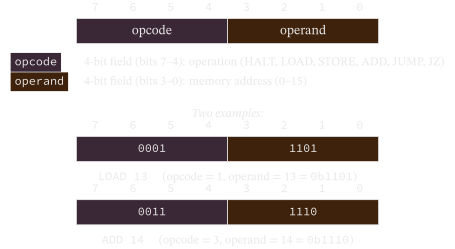
The code that performs this split is the decoder. It calls to_bits to expand the word into eight bits, then reads the two nibbles.
Example 5-1. Instruction decoder: split an 8-bit word into opcode and operand
def decode(word: int) -> tuple[int, int]:
    """Split an instruction word into (opcode, operand), the field extraction a
    hardware decoder performs."""
    bits = to_bits(word, _WORD_BITS)
    operand = from_bits(bits[0:4])1
    opcode = from_bits(bits[4:8])2
    return opcode, operand
- operand = from_bits(bits[0:4]): the low nibble. Bits are stored least-significant first, so index 0 is bit 0. The operand is the 4-bit address the instruction names, exactly the right field shown in Figure 5.2.
- opcode = from_bits(bits[4:8]): the high nibble. Bits 4 through 7 carry the operation code, the left-hand field in the bytefield diagram.
5.3 Fetch, decode, execute
The CPU runs one loop forever until a HALT instruction stops it: fetch the word at the program counter, advance the counter, decode the word, execute the operation. Figure 5.3 shows the three steps.
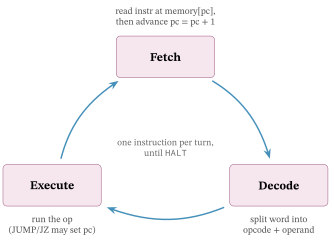
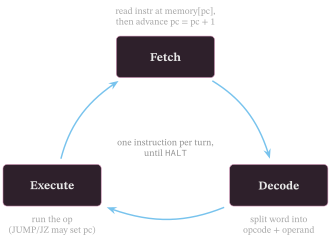
The CPU class holds the whole machine state: a 16-word memory array, the accumulator, the program counter, and a halted flag.
Example 5-2. CPU class: one step is one fetch-decode-execute cycle
class CPU:
    """Accumulator CPU: memory, accumulator, program counter, halted flag."""

    def __init__(self, program: list[int]) -> None:
        if len(program) > _MEMORY_WORDS:
            raise ValueError(
                f"program has {len(program)} words but memory holds {_MEMORY_WORDS}")
        self.memory = list(program) + [0] * (_MEMORY_WORDS - len(program))
        self.acc = 0
        self.pc = 0
        self.halted = False

    def step(self) -> None:
        """Run one fetch-decode-execute cycle."""
        if self.halted:
            return
        word = self.memory[self.pc]1
        self.pc = _add(self.pc, 1, _ADDR_BITS)2
        opcode, operand = decode(word)3
        if opcode == HALT:4
            self.halted = True
        elif opcode == LOAD:
            self.acc = self.memory[operand]
        elif opcode == STORE:
            self.memory[operand] = self.acc
        elif opcode == ADD:
            self.acc = _add(self.acc, self.memory[operand], _WORD_BITS)
        elif opcode == JUMP:
            self.pc = operand
        elif opcode == JZ:
            if self.acc == 0:
                self.pc = operand
        else:
            raise ValueError(f"unknown opcode {opcode}")

    def run(self, max_steps: int = 100) -> None:
        """Step until HALT or max_steps."""
        steps = 0
        while not self.halted and steps < max_steps:
            self.step()
            steps += 1
- word = self.memory[self.pc]: the fetch. The PC is an index into the memory array, and this line reads the instruction word stored at that address, exactly as a real CPU drives the address bus and reads the data bus.
- self.pc = _add(self.pc, 1, ...): the advance. The PC is incremented through the gate-built ripple adder of Chapter 3, so every counter step is still gates all the way down. Because the increment happens before execute, any JUMP or JZ that fires overwrites the already-advanced PC with the branch target.
- opcode, operand = decode(word): the decode step calls the function from Section 5.2 to split the word into its two fields.
- if opcode == HALT: the control dispatch. Each branch of the conditional corresponds to one row of the instruction-set table. This is the control unit: a decision tree over the opcode that asserts the right signals.
5.4 The datapath
Figure 5.4 shows how the components wire together. The program counter drives the memory address input. Memory outputs one instruction word per cycle. The decoder splits the word: the opcode goes to the control unit; the operand is a memory address: it drives the memory read port, and the value memory returns at that address becomes the ALU’s second operand. The ALU adds the memory value to the accumulator and writes the result back. The control unit manages writes to the accumulator and, on a STORE instruction, to memory. A dedicated ripple adder (the +1 node in the figure) increments the PC every cycle; the control unit overrides that value with a branch target only on JUMP or JZ.
The accumulator and the PC are the registers of Chapter 4: small fixed-width stores that hold a value across cycles. The adder is the circuit of Chapter 3: given two inputs it produces a sum. Only the control unit is new, and it is just a conditional on the opcode.
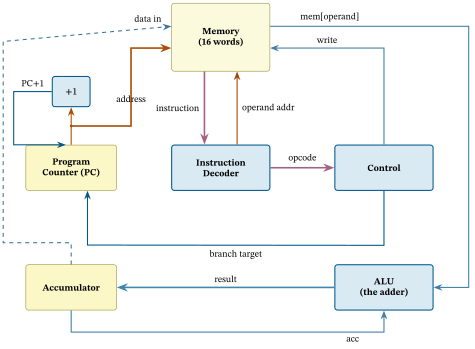
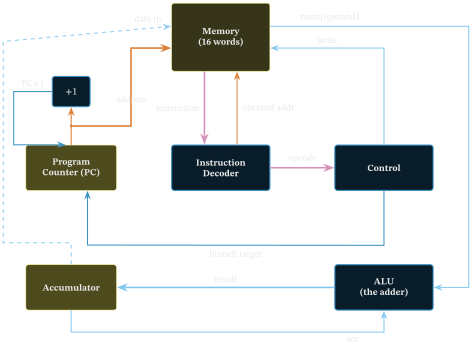
Figure 5.4. The CPU datapath. The program counter drives the memory address; memory outputs the instruction; the decoder splits it into opcode (to the control unit) and operand (back up to the memory read port). The value memory returns feeds the ALU; the ALU adds and the result feeds the accumulator. The dashed line is the STORE write-back path.
5.5 Running a program
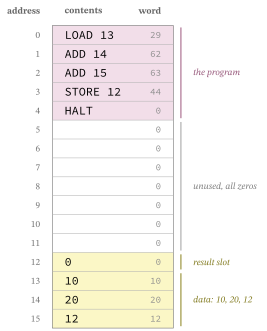
An example program sums three values stored at addresses 13, 14, and 15, writes the result to address 12, and halts. It is five instructions followed by three data cells with room to spare in the 16-word address space.
Example 5-3. Example program: sum three data cells and store the result
def example_program() -> list[int]:
    """A program that sums three data cells (addresses 13, 14, 15) into the
    accumulator, stores the result at address 12, and halts."""
    program = [0] * _MEMORY_WORDS
    program[0] = encode(LOAD, 13)1
    program[1] = encode(ADD, 14)
    program[2] = encode(ADD, 15)
    program[3] = encode(STORE, 12)
    program[4] = encode(HALT, 0)
    program[13], program[14], program[15] = 10, 20, 12
    return program
- program[0] = encode(LOAD, 13): the first instruction loads the value at address 13 (which is 10) into the accumulator. The two ADD instructions that follow accumulate the values at addresses 14 and 15. Each call to encode packs an opcode and an address into one 8-bit word using the layout of Figure 5.2.
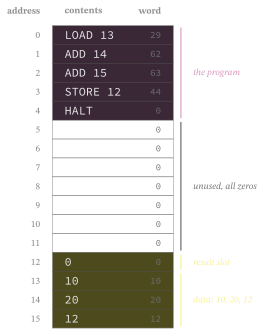
Figure 5.5 is the memory image this function builds, the moment before the first cycle. The five instructions occupy addresses 0 through 4 and the data sits at 13 through 15, safely past the last instruction. Address 12 is the result slot, initially zero; after STORE 12 executes it will hold 10 + 20 + 12 = 42.
The main machine is now complete: switches became gates, gates became arithmetic and memory, and those pieces became a CPU that runs a stored program. The next pages are optional processor side reads. They ask how circuits this large are described, how one core overlaps work, and how it hides slow memory.
Exercises
- Add a subtract instruction to the machine. What is the smallest change to the decoder and the run loop? Chapter 3’s exercises asked you to build subtraction.
- Write a program in this instruction set that multiplies two small numbers by repeated addition, and run it.