Chapter 5
How does a CPU hide slow memory?
- The browser
- The network
- Software and languages
- The CPU
- Memory
- Arithmetic
- Logic gates
- The switch
The pipeline of Chapter 5.b keeps the core busy, finishing an instruction almost every cycle. But every instruction is fetched from memory, and memory is slow. A core can do an addition in about a cycle; a read from main memory can cost a few hundred. Left alone, the fast machine we built would spend almost all of its life waiting for the next word to arrive. This chapter is about the trick that hides the wait, one of the central performance ideas in hardware.
5.1 How far away memory is
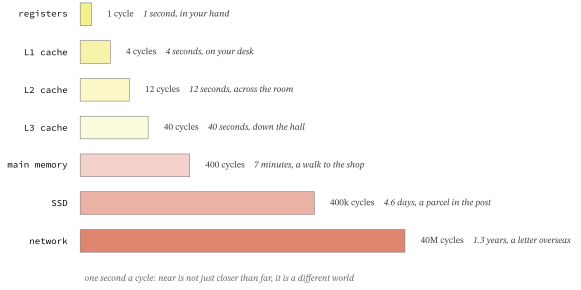
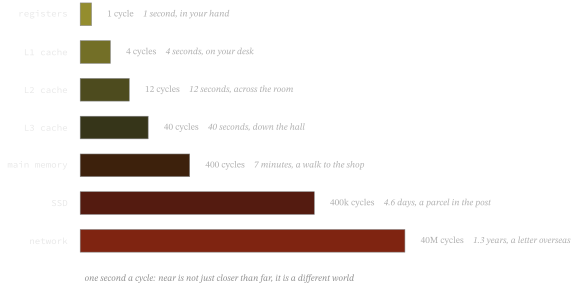
The gap is easier to feel if we stretch time. Suppose one clock cycle lasted one whole second. Then reaching the nearest, smallest, fastest memory takes a few seconds; reaching main memory takes minutes; reaching the disk takes days; and reaching another machine across the network takes over a year. Figure 5.2 lays the distances out on that human scale.
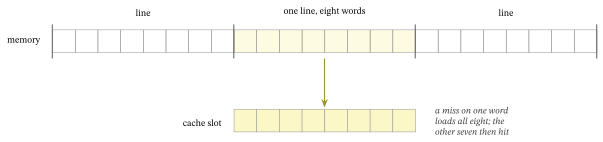
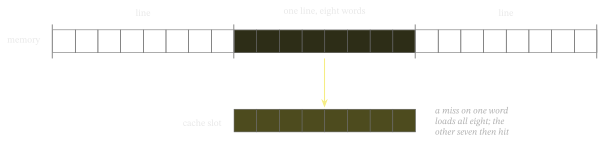
No single memory can be both large and close, so machines use several at once: a small, fast one right beside the core, backed by larger, slower ones further out. The small fast pools are caches, built from the same idea of cross-coupled stored bits as the registers of Chapter 4. The whole scheme works only because programs are predictable, in two ways. A word just used is likely to be used again soon (temporal locality), and the words next to it are likely to be used soon after (spatial locality). Figure 5.3 shows how the second of those leads a cache to move data in whole lines, not single words.
5.2 Keeping the hot data near
The model here is the simplest cache that works, a direct-mapped one. Each line of memory maps to exactly one slot in the cache, chosen by its number. A load hits if that slot already holds the line it wants, and otherwise misses, fetches the line, and evicts whatever was there.
Example 5-1. A direct-mapped cache
class Cache:
    """A direct-mapped cache: every memory line maps to exactly one slot."""

    def __init__(self, slots: int = SLOTS, line: int = LINE):
        self.line = line
        self.blocks = [None] * slots   # the line number in each slot, or None

    def load(self, address: int) -> bool:
        """Look up an address. Return True on a hit; on a miss, load its line into
        the one slot it maps to, evicting whatever was there, and return False."""
        block = address // self.line1
        slot = block % len(self.blocks)
        hit = self.blocks[slot] == block2
        self.blocks[slot] = block3
        return hit
- the address divided by the line size names the line it belongs to
- a hit is when the one slot that line maps to already holds it
- on a miss the line is loaded into that slot, evicting the old one: this is why two lines that map to the same slot keep pushing each other out
5.3 The hit rate is everything
A cache only helps when it hits, so the number that matters is the hit rate. The arithmetic is brutal. An average access costs the fast hit time always, plus the slow miss penalty on the fraction that miss. When the penalty is a hundred times the hit, even a small miss rate dominates the average.
Example 5-2. The average cost of an access
def average_access(hit_rate: float) -> float:
    """The cost of an average access: the hit time always, plus the miss penalty
    on the fraction that miss. A small miss rate on a large penalty still hurts."""
    return HIT_TIME + (1 - hit_rate) * MISS_PENALTY1
- the hit time is paid on every access; the miss penalty only on the misses, but it is so large that a few percent of them decide the average
The cache does not make memory fast; it makes the slow trip rare. That closes the processor performance path. The next page is the one optional hardware detour in this sequence: how an FPGA loads a circuit as data. After that, the story turns to the software that runs on the stored-program machine.
Exercises
- Double the line size in the model. What happens to the scan’s hit rate, and why?
- Give the cache more slots. Which of the three patterns improves, and which does not?
- At a miss penalty of a hundred cycles, what hit rate does a program need to average under two cycles per access?