The Software · Chapter 7
How do programs run programs?
Transcript
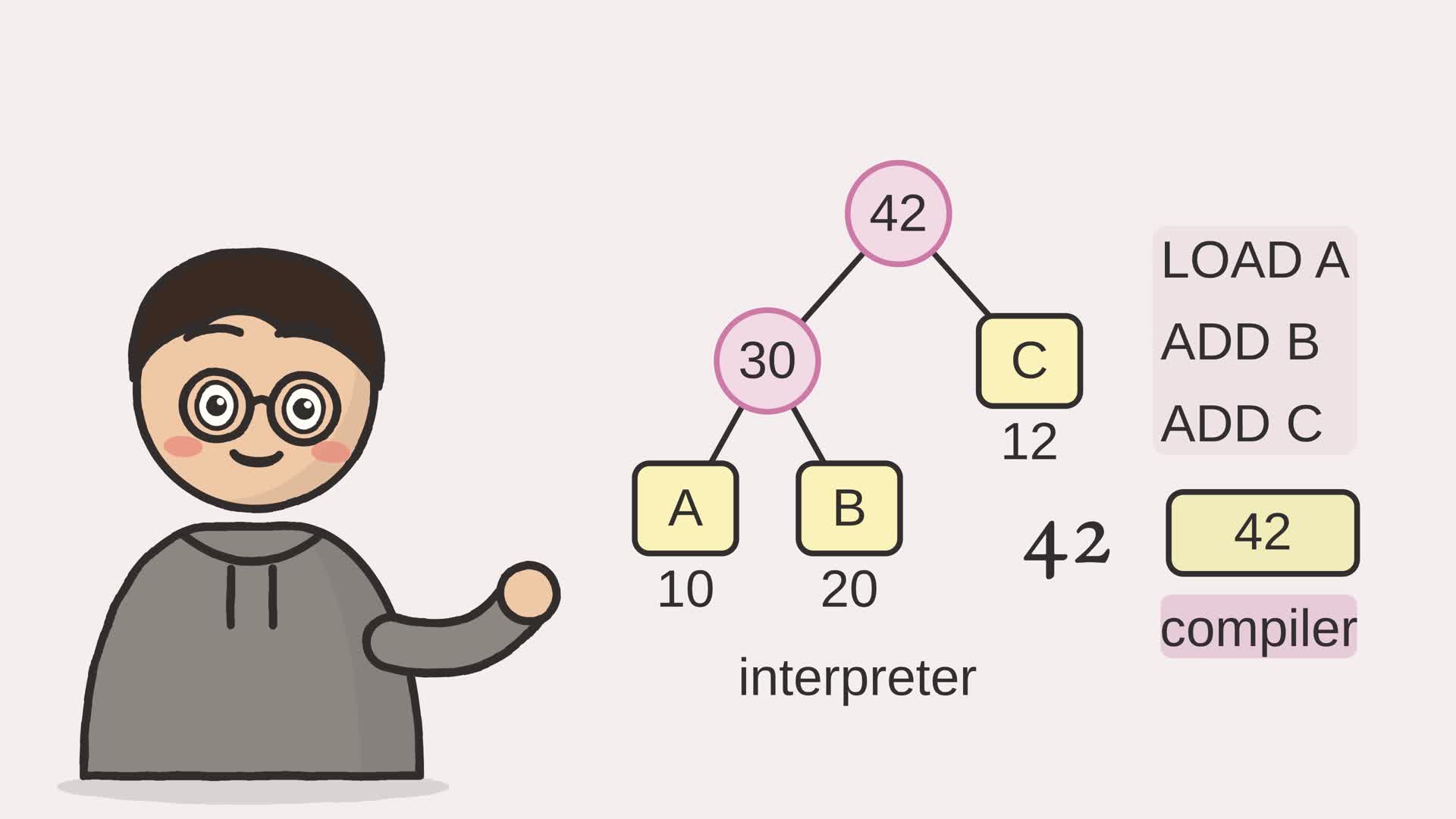
How do programs run programs? Our CPU only runs eight-bit words. But you can type A plus B plus C, and get forty-two.
I figured there's one way: translate it into CPU words first. But a program can just read the sum and do the math itself, writing no words at all.
First, the parser turns the text into a tree: a plus at the top, A plus B on the left, C on the right. A is ten, B is twenty, C is twelve. Walk it: A plus B is thirty, plus C is forty-two. That walker is an interpreter. Or translate it: load A, add B, add C, and run those words on our CPU. That translator is a compiler. The CPU ends up holding forty-two too.
So programs run programs two ways, with one answer! An interpreter is a program that runs a program; a compiler is a program that writes one.
Type any sum below and race the two routes. Do they ever disagree?
- The browser
- The network
- Software and languages
- The CPU
- Memory
- Arithmetic
- Logic gates
- The switch
Chapter 6 built an assembler: a program that translates text into machine code, one line to one instruction. That is already a program operating on another program. Chapter 6.b then showed how any text is first cut into tokens; this chapter finally builds the machinery that consumes them. We climb one level and invent a small language of arithmetic, more abstract than assembly, and ask how a machine that only knows 8-bit words could possibly run it. There are two classic answers, and this chapter builds both.
The first answer is to interpret: write a program that reads the new language and computes its meaning directly, step by step. The second is to compile: write a program that translates the new language down into one the machine already runs, and then run that. An interpreter is a program that runs a program. A compiler is a program that writes one. Both end at the same number, and seeing why is the point of the chapter.
7.1 A tiny language, and its tree
The language is deliberately small: integer literals, variable names, addition, and parentheses. An expression like (a + b) + c is the whole of it. Small as it is, it has the one feature that makes a language more than a list of instructions: structure. The parentheses group sub-expressions, and groups can nest. Before anything can run such a program, the flat text has to be turned into that structure.
To match the CPU, this language works with unsigned bytes. Literals and input values must be integers from 0 to 255, and each addition keeps only its low eight bits: 255 + 1 is 0, and 200 + 100 is 44. In Python, % 256 expresses that wrap by taking the remainder after division by 256. Both execution routes use this rule. The compiled route also needs its code and data to fit the CPU’s sixteen words; the compiler rejects a larger program.
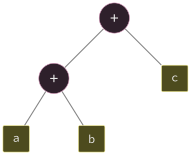
Turning text into a tree happens in two steps. A lexer like Chapter 6.b’s chops the characters into tokens: names, numbers, and the symbols +, (, ). A parser then assembles the tokens into a tree, the abstract syntax tree, which makes the grouping explicit. Figure 7.2 shows the tree for (a + b) + c: the outer addition sits at the root, with the inner a + b as its left child and c as its right.
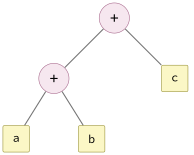
leaf is a variable. The parser builds this tree; the
interpreter and the compiler each walk it.The parser is the smallest kind that handles nesting: recursive descent. One method reads an expression as a sequence of terms joined by +; another reads a single term, which is a number, a name, or a parenthesized expression, and a parenthesized expression sends it back to the first method. The recursion in the grammar becomes recursion in the code.
Example 7-1. Recursive-descent parser: tokens into a tree
class _Parser:
    """A recursive-descent parser. expr = term ('+' term)*; term = number |
    name | '(' expr ')'."""

    def __init__(self, tokens: list[str]) -> None:
        self.tokens = tokens
        self.pos = 0

    def _peek(self) -> str | None:
        return self.tokens[self.pos] if self.pos < len(self.tokens) else None

    def _advance(self) -> str:
        if self.pos >= len(self.tokens):
            raise ValueError("unexpected end of input")
        tok = self.tokens[self.pos]
        self.pos += 1
        return tok

    def expr(self) -> tuple:
        """Parse a sequence of terms joined by +, left to right."""
        node = self.term()
        while self._peek() == "+":
            self._advance()
            node = Add(node, self.term())1
        return node

    def term(self) -> tuple:
        """Parse a single number, name, or parenthesized expression."""
        tok = self._advance()
        if tok == "(":
            node = self.expr()2
            if self._advance() != ")":
                raise ValueError("missing closing parenthesis")
            return node
        # The tokenizer emits only all-digit numbers and alpha-started names, so
        # these two checks are collectively exhaustive for any real token.
        if tok.isdigit():
            return Num(int(tok))
        if tok.isalnum():
            return Var(tok)
        raise ValueError(f"unexpected token {tok!r}")
- each + combines the tree built so far with the next term, which makes addition group left to right: a + b + c parses as (a + b) + c
- a parenthesized group calls expr again, so the parser descends into the parentheses and comes back with a sub-tree; this one line is what lets expressions nest to any depth
7.2 Interpreting: walk the tree
With the tree in hand, the first way to run the program is the most direct one: walk the tree and compute as you go. The interpreter is one recursive function. A number node evaluates to its value. A variable node evaluates to whatever the environment binds it to, with either value checked against the byte range. An addition node evaluates its two children, adds the results, and wraps at 256. The structure of the function mirrors the structure of the tree.
Example 7-2. Interpreter: evaluate the tree directly
def interpret(node: tuple, env: dict[str, int]) -> int:
    """Evaluate byte operands, wrapping each sum at eight bits like the CPU."""
    if isinstance(node, Add):
        return (interpret(node.left, env) + interpret(node.right, env)) % 2562
    value = node.value if isinstance(node, Num) else env[node.name]1
    if type(value) is not int or not 0 <= value <= 255:
        raise ValueError("operands must be integers from 0 to 255")
    return value
- a variable is looked up in env, the mapping from names to values; this is the only place the program’s inputs enter
- an addition recurses into both children and wraps the sum at 256, so the whole tree collapses to one byte from the leaves upward
Nothing here produces machine code. The interpreter is the machine: it holds the result in an ordinary Python variable and never mentions an opcode. This is close to how many real languages run, from shell scripts to early BASIC interpreters that walked the source directly. Python only resembles this in style; it compiles the source to bytecode first and runs that on a virtual machine rather than walking the tree itself.
7.3 Compiling: write a program
The second way is indirect. Instead of computing the answer, the compiler walks the same tree and emits a second program, written in the assembly of Chapter 6, that will compute the answer when run. The machine of Part I can only load, add, and store, so the compiler must express the whole expression in those terms.
One observation makes this easy. Addition associates, including when each sum wraps at 256: grouping changes neither the final low eight bits nor the answer. So a tree built only from additions is just the sum of its leaves, in order. The compiler flattens the tree to that list of leaves, gives each distinct operand a memory cell, then emits code that loads the first operand and adds the rest.
Example 7-3. Compiler: emit Chapter 6 assembly
def compile_expr(node: tuple, env: dict[str, int]) -> str:
    """Compile an expression into assembly that computes it.

    Each distinct operand becomes a DATA cell; the code loads the first leaf and
    adds the rest, then stores the result. A leading JUMP skips the data cells.
    The compiler's own labels begin with an underscore, a character the
    tokenizer never allows in a variable name, so they can never clash with the
    program's own variables. Reject non-byte operands and images over 16 words.
    """
    leaves = _leaves(node)1
    cells = {}   # label -> value, one entry per distinct operand
    order = []   # operand labels in the order they are loaded and added
    for leaf in leaves:
        value = interpret(leaf, env)  # validate the same byte domain on both paths
        if isinstance(leaf, Var):
            label = leaf.name
        else:
            label = f"_lit{leaf.value}"2
        cells.setdefault(label, value)
        order.append(label)
    lines = ["        JUMP _start"]
    for label, value in cells.items():
        lines.append(f"{label}: DATA {value}")
    lines.append("_result: DATA 0")
    lines.append(f"_start:  LOAD {order[0]}")3
    for label in order[1:]:
        lines.append(f"        ADD {label}")
    lines.append("        STORE _result")
    lines.append("        HALT")
    if len(lines) > 16:
        raise ValueError(f"compiled program needs {len(lines)} words; CPU holds 16")
    return "\n".join(lines) + "\n"
- _leaves flattens the addition tree into its operands, left to right; associativity is what makes this flat list correct
- a literal gets a data cell named _lit42 and so on. The leading underscore matters: the lexer forbids underscores in a name, so a compiler-chosen label can never collide with one the programmer wrote. Compilers really do generate names like this.
- the first operand is loaded here; the loop just below emits an ADD for each remaining leaf and then a STORE, the same LOAD/ADD/STORE shape as Chapter 5’s example program
The output is ordinary assembly text. Feeding the expression (a + b) + c to the compiler produces the program that loads a, adds b, adds c, and stores the result: the same shape Chapter 6 wrote by hand, differing only in the compiler-chosen label names. The compiler did the writing this time.
7.4 Both ways agree
Now the two paths can be run side by side. The interpreter walks the tree and returns a number. The compiler emits assembly; the Chapter 6 assembler turns it into machine code; the Chapter 5 CPU runs it. Figure 7.3 traces both routes from the same tree to the same answer.
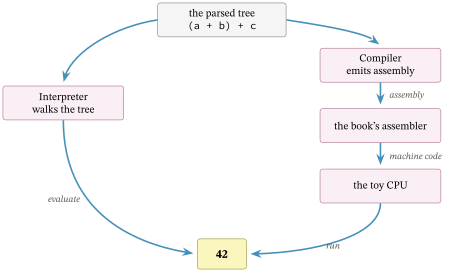
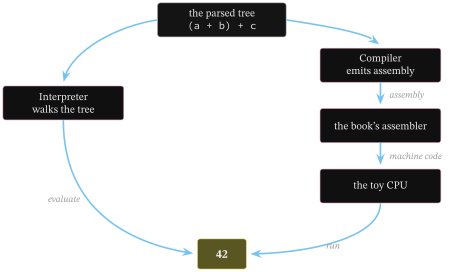
Running ftb.language does exactly this: it parses the expression, shows the tree, interprets it, compiles it, runs the compiled program on the CPU, and reports whether the two answers match.
source:      (a + b) + c
environment: {'a': 10, 'b': 20, 'c': 12}
parsed tree: Add(left=Add(left=Var(name='a'), right=Var(name='b')), right=Var(name='c'))

interpreted directly: 42

compiled to assembly:
        JUMP _start
a: DATA 10
b: DATA 20
c: DATA 12
_result: DATA 0
_start:  LOAD a
        ADD b
        ADD c
        STORE _result
        HALT

compiled, assembled, and run on the CPU: 42

both ways agree: True
The interpreted result and the compiled-and-run result are both 42, and they are the same 42 as Chapters 5 and 6. The compiled assembly is recognisably their example program, generated now from a higher-level expression rather than written out by hand. That agreement is not a coincidence: both routes compute the meaning of the same tree, one by walking it, the other by translating it into a machine that walks instructions instead. That meaning includes the byte rule: 255 + 1 reaches 0 on both paths. The comparison applies to expressions whose generated program fits memory.
This language only computes expressions; the next chapter adds the state and loops that make a language.
Exercises
- Plan a subtraction extension. Why can subtraction not use the compiler’s associative flattening? What instruction or instruction sequence would compute it on this CPU?
- Add multiplication, binding tighter than addition. Where in the parser does that precedence live?